
What Is USB Technology Evolution?
What Are the Differences Between USB 1.0, USB 2.0, USB 3.0, and USB4? A Complete Guide to USB Technology Evolution and Development History
USB (Universal Serial Bus) is one of the most widely used electronic connection interfaces worldwide, commonly found in computers, smartphones, consumer electronics, industrial equipment, and various electronic devices.
Since the introduction of USB 1.0 in 1996, USB technology has undergone multiple generations of development. Data transmission speeds have increased from Mbps levels to tens of Gbps with USB4, while USB has evolved from a simple data interface into a multifunctional connection solution integrating high-speed data transfer, power delivery, and video transmission.
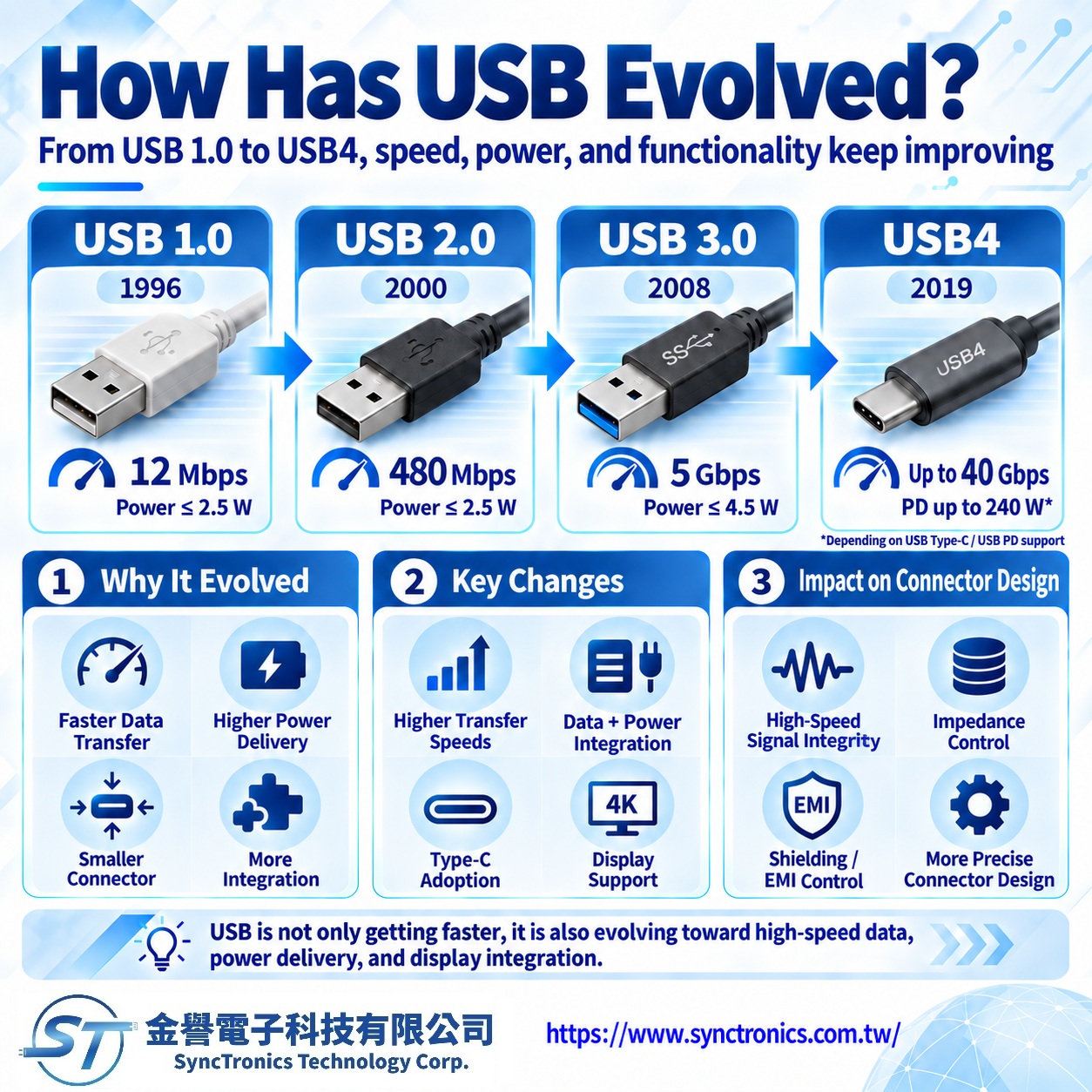
Why Has USB Continued to Evolve?
Early USB technology was developed to replace traditional interfaces such as:
- RS-232 serial ports
- PS/2 keyboard and mouse connectors
- Parallel ports
As electronic devices continued to advance, users required:
- Faster data transmission speeds
- Higher charging power
- Smaller connector designs
- Greater functional integration
These demands drove continuous USB technology development.
USB Technology Development Timeline
|
USB Version |
Release Year |
Maximum Data Rate |
Main Features |
|
USB 1.0 |
1996 |
12 Mbps |
Established universal connection standards |
|
USB 2.0 |
2000 |
480 Mbps |
Popularized high-speed data transfer |
|
USB 3.0 |
2008 |
5 Gbps |
Major improvement in transmission speed |
|
USB 3.1 / USB 3.2 |
2013 |
10–20 Gbps |
Advanced high-speed applications |
|
USB4 |
2019 |
40 Gbps |
Integrated high-speed data and video capabilities |
What Is USB 1.0?
USB 1.0 was the first generation of USB standards, introduced in 1996.
Its main objectives were:
- Creating a unified connection standard for computer peripherals
- Reducing interface complexity
- Providing Plug and Play functionality
USB 1.0 supported:
- Low Speed: 1.5 Mbps
- Full Speed: 12 Mbps
Typical applications included:
- Keyboards
- Mice
- Printers
- Basic computer peripherals
Due to limited speed, USB 1.0 was not suitable for large-scale data transfer.
What Is USB 2.0?
USB 2.0 was introduced in 2000 and became one of the most successful and widely adopted USB generations.
Maximum transmission speed:
480 Mbps (High Speed)
Compared with USB 1.0, USB 2.0 provided a significant improvement in data transfer capability.
Common applications included:
- USB flash drives
- External hard drives
- Digital cameras
- Mobile device connections
- Printers
USB 2.0 established a long-lasting connection standard for consumer electronics.
What Is USB 3.0?
USB 3.0 was introduced in 2008 and was also known as SuperSpeed USB.
Maximum transmission speed:
5 Gbps
Compared with USB 2.0:
|
Item |
USB 2.0 |
USB 3.0 |
|
Data Rate |
480 Mbps |
5 Gbps |
|
Performance Improvement |
- |
Approximately 10× faster |
|
Data Channels |
Single direction |
High-speed bidirectional transfer |
|
Applications |
General peripherals |
High-speed devices |
USB 3.0 became widely used in:
- SSD external storage
- High-resolution imaging equipment
- Industrial cameras
- High-speed data devices
What Is USB4?
USB4 represents a major advancement in USB technology and was officially introduced in 2019.
Maximum transmission speed:
Up to 40 Gbps
Key features include:
- High-speed data transfer
- DisplayPort video support
- Thunderbolt technology compatibility
- USB Type-C connector support
USB4 is mainly used in:
- High-performance laptops
- AI workstations
- High-speed storage devices
- Docking systems
Comparison of USB 1.0, USB 2.0, USB 3.0, and USB4
|
Feature |
USB 1.0 |
USB 2.0 |
USB 3.0 |
USB4 |
|
Release Year |
1996 |
2000 |
2008 |
2019 |
|
Maximum Speed |
12 Mbps |
480 Mbps |
5 Gbps |
40 Gbps |
|
Main Application |
Basic peripherals |
General data transfer |
High-speed devices |
Advanced integrated connectivity |
|
Video Support |
No |
Limited |
Limited |
Supported |
|
Type-C Support |
No |
No |
Available |
Primary interface |
How USB Evolution Has Impacted Connector Design
The advancement of USB generations has driven continuous improvements in connector and cable technology.
Key engineering challenges include:
- Higher-frequency signal integrity
- Impedance control
- EMI (Electromagnetic Interference) management
- Higher current carrying capability
- Tighter manufacturing tolerances
High-speed interfaces such as USB4 require advanced:
- High-speed cable design
- Shielding structures
- Differential signal control
- Connector quality management
Future Development of USB Technology
Future USB development will continue toward:
- Higher transmission speeds
- Higher power delivery capability
- Smaller connector designs
- Greater functional integration
USB Type-C is expected to remain a major connection standard for laptops, smartphones, and electronic devices.
Conclusion
From USB 1.0, USB 2.0, USB 3.0, to USB4, USB technology has evolved over more than two decades from a simple data interface into a comprehensive connectivity solution integrating high-speed data transfer, power delivery, and video transmission.
With increasing demand from AI servers, high-performance computing systems, industrial electronics, and smart devices, USB interfaces continue to require higher speed, improved reliability, and better signal integrity, driving ongoing innovation in connector and cable technologies.
SyncTronics Solutions
SyncTronics Technology provides connector and cable application solutions that support high-mix, low-volume production as well as diverse application requirements. Based on customer application requirements, we assist in evaluating suitable connectors, cables, and related specifications, including high-speed transmission, signal integrity, EMI suppression, and customized cable harness requirements. Our solutions help industrial equipment manufacturers, telecommunications companies, AI server providers, and electronics industries improve connection reliability and overall system performance.
Need Wire Harnesses, Connectors, Electromechanical Components, or Custom Solutions? Contact Us Today
Whether you are looking for connectors,
cables, wire harness assemblies, electromechanical components, or complete
electronic interconnect solutions, SyncTronics provides professional technical
support and engineering evaluation for product selection, specification
verification, New Product Introduction (NPI), OEM/ODM customization, as well as
high-speed transmission, high-reliability, and other specialized application
requirements.
We welcome you to visit our Contact Us page
and share your project requirements and contact information. Our team is
committed to responding quickly and professionally, evaluating the most
suitable products and electronic interconnect solutions based on your product
specifications, application requirements, and project objectives. We also
provide technical recommendations and customized engineering support to help
shorten product selection and development time, reduce project risks, and
accelerate your path to mass production. We look forward to the opportunity to
work with you and provide reliable technical support and practical solutions
for every stage of your project.
Related Articles:
USB Type-A, Mini USB, Micro USB to USB Type-C Evolution Explained | SyncTronics Technology
What Are PCI and PCIe? PCI Express High-Speed Expansion Interface Evolution | SyncTronics Technology
What Is SATA? IDE, SATA, and NVMe Storage Interface Evolution | SyncTronics Technology
Storage Interface Evolution: IDE, SCSI, SATA, SAS, and NVMe Explained | SyncTronics Technology
Disclaimer and Technical Exchange Statement
This content is compiled based on publicly available information and industry
experience, intended solely for reference during technical exchanges. It does
not constitute any commercial, technical, or legal advice or basis.
The specifications, materials, manufacturing processes, application methods,
and related information described herein may vary due to differing design
conditions, environmental factors, or usage scenarios. No guarantees are made
regarding the completeness, correctness, or suitability of such content.
Readers should verify the suitability with the responsible design or technical
personnel based on actual application scenarios, and independently assess all
associated risks.
Frequently Asked Questions (FAQ)
- What is Connector Knowledge
- Wire Related issues
- Materials-Related
- Regulatory Issues
- Electronic issues
- Manufacturing Technology
- Testing & Verification
- Quality Management
- History & Evolution
- What Is USB Technology Evolution?
- What Is HDMI Technology Evolution?
- What Are the Differences Between CAT5, CAT5e, CAT6, CAT6A, CAT7, and CAT8? A Complete Guide to Ethernet Cable Evolution
- What Are PCI and PCI Express (PCIe)?
- What Are RS-232, RS-422, and RS-485?
- What Is SATA? A Complete Guide to the Evolution from IDE, SATA to NVMe Storage Interfaces
- What Is DisplayPort (DP)?
- What Is DVI? A Comparison of the Evolution from DVI, HDMI, and DisplayPort
- What Is a Storage Interface?
- USB Type-A, Mini USB, Micro USB to USB Type-C: Complete USB Connector Evolution Guide